
Spatial Instruments
Between 2019 and 2024, the Spatial Instrument series explored a single proposition: that perception itself can be composed.
Each project in the series built environments where spatial audio became an instrument for redirecting how people listen, attend, and make decisions. Rather than placing sound inside a room, the work turned the room into a musical structure, one that responded to the presence and movement of its audience. Listeners did not consume content. They navigated a field of signals, discovering patterns, losing them, and finding new ones.
The underlying research drew on neuroscience of pattern recognition, spatial cognition, and the relationship between architecture and sound. But the driving question was always experiential, not technical: what happens when you give someone control over a sensory environment that is too complex to fully resolve? The answer, consistently, was that people improvise. They build meaning from incomplete information. They project connections where none were designed.
This observation, that the audience’s perception actively constructs the coherence it believes it is receiving, became the conceptual foundation for everything that followed. The tools developed here, spatial audio systems, real-time generative frameworks, audience-responsive installations, now serve a different set of questions in the Concurrentix series, where the focus has shifted from how we perceive to what we believe we are perceiving, and why those beliefs break down.
Related Research: Spatial Music Framework
The Spatial Instrument series grew out of a sustained research question: what happens when space itself becomes a compositional medium, not a container for sound but a structure that shapes how sound is heard, moved through, and understood?
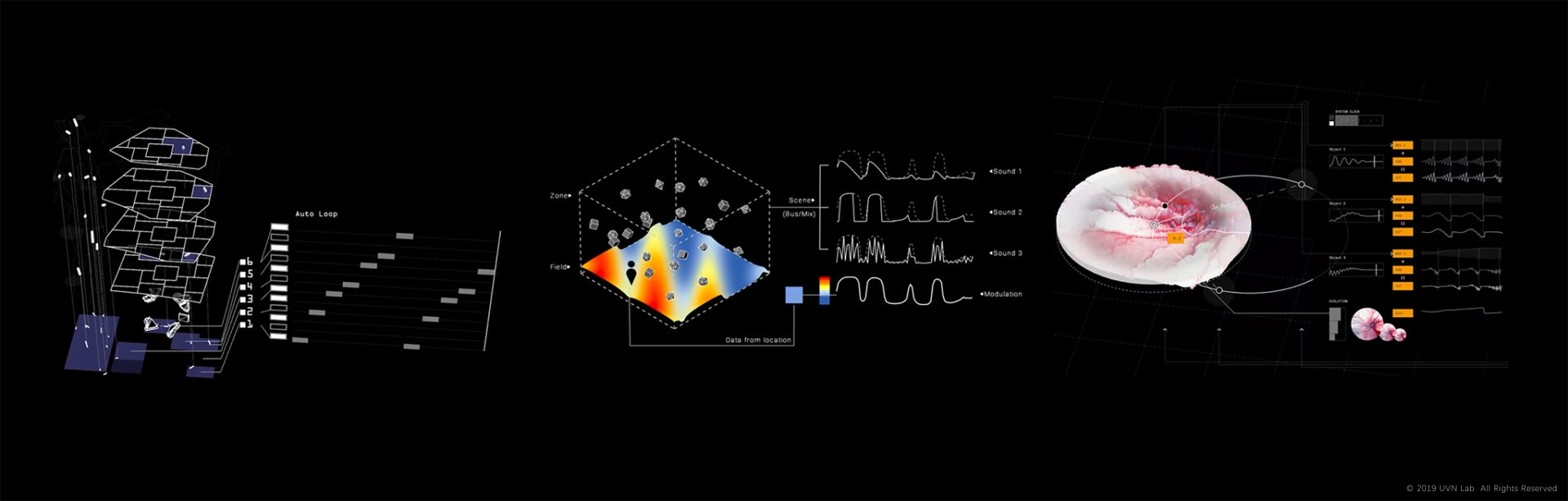
Beginning in 2019, this research led to the development of custom spatial DAW systems that treat three-dimensional space the way a traditional sequencer treats time. Virtual spatial structures define how sound behaves in a room. Physical instruments give performers and audiences the means to reshape those structures in real time. The boundary between composition and architecture dissolves: a room is a score, a listener’s movement is a performance, and the act of hearing becomes an act of spatial decision-making.
This framework also opened a line of inquiry into non-visual perception and accessibility. If spatial sound can carry narrative, orientation, and choice without relying on vision, it becomes a medium through which people who navigate the world differently can participate as authors, not just recipients. Several projects in this series explored that possibility directly.
The technical and conceptual tools developed through this research continue to inform my current practice, where spatial audio serves not as the primary subject but as one layer in a larger audiovisual system.
Master clock
128BPM · 4/4
1.1.1default
—no field events yet
Fields · bpm
Position
Outside fields
—Drive onto a field to queue it
Heat under you—
Click to start sound · drag to move
Auto tour · drag up or down to take over
Display
Tempo
BPM
Quantize
Spatial Field Set
Three spatial-music systems in one map: a live set laid out as fields on a shared clock, distance-to-parameter modulation, and panned target objects.
- MoveDrag up or down to thrust forward or back, left or right to turn. The farther from where you touched, the stronger. Let go to coast. Keys: W/S thrust, A/D turn.
- EnterDriving onto a field queues it. On the next quantize point it starts, rises as a point cloud, and takes over the master tempo.
- LeaveDriving off queues it to close on the next point. Come back before then and it keeps playing. Leave before it starts and it never starts.
- ObjectsEach glowing point is a sound object, breathing with its own loop. An arc links you to the ones in reach, brighter as you get closer. It pans by direction relative to where you face, and your distance reshapes the sound instead of the volume.
- GroundThe point cloud rises with the master level. Every quantize point sends a ripple out from you.
- AutoLeave it alone for five seconds and it tours the fields by itself. You can still turn to look and listen around. Drag up or down to take over.
- TempoWith no field playing the clock runs at the base tempo, 128 BPM by default. Change it in the menu, or switch off "Fields set the tempo" to keep it everywhere.
- DisplayClock, field list and readouts are in the menu at the bottom right. All of them start hidden.
Headphones recommended